
At a glance
| Feature | Who it's for | Action required |
|---|---|---|
| Check-in Module | Admins, Briefing Managers, reception staff | Admin: enable the standalone Check-in Module per site (optional) |
| Monthly Calendar Access | Account Managers / Requesters, Speakers | Admin: turn on per role (off by default) |
| AI Executive Brief | Admins, Briefing and Engagement Managers, Account Managers | None. On by default. |
| Salesforce Engagement Sync | Admins | Upgrade the Salesforce package to 7.0, then turn on (off by default) |
| Report Builder – Unified Attendees | Report Builder users | Review saved reports that mix Internal and Customer attendee fields |
| External Request Form – Additional Attendees | Admins, external requesters | Admin: review settings per External Visit Type |
| Salesforce Custom Account and Opportunity IDs | Admins | Upgrade the Salesforce package to 7.0 |
| Speaker Search Filter for Linked Topics | Briefing Managers | None |
| Calendar and Participant Schedule display updates | All users | None |
| External Attendee to Internal Profile Conversion | Admins | None |
Check-in Module
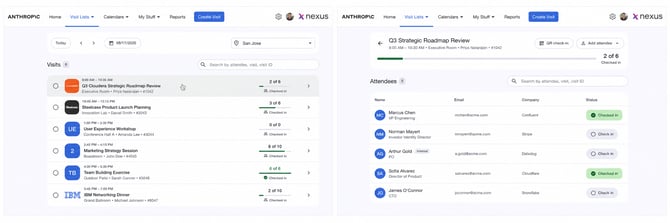
The Check-in experience has been redesigned for faster onsite arrivals. Admins and Briefing Managers get a new card-based Check-in page, and a new standalone Check-in Module lets reception and lobby staff check people in without access to the rest of Nexus.
- Find visits by site and date, and search by attendee, visit name, or Visit ID.
- Give each site its own standalone Check-in URL, with optional six-digit Access PIN protection.
- Add walk-in attendees, who are checked in automatically.
- Let attendees check themselves in by scanning a visit-specific QR code on their own device.
- Check in a visit separately from its individual attendees.
Action required: None for the internal Check-in page. To use standalone or QR check-in, an Admin turns on the Check-in Module in Admin / Settings > Sites > Edit Site > External Access.
Learn more about the Check-in Module -->
Monthly Calendar Access for Account Managers / Requesters and Speakers
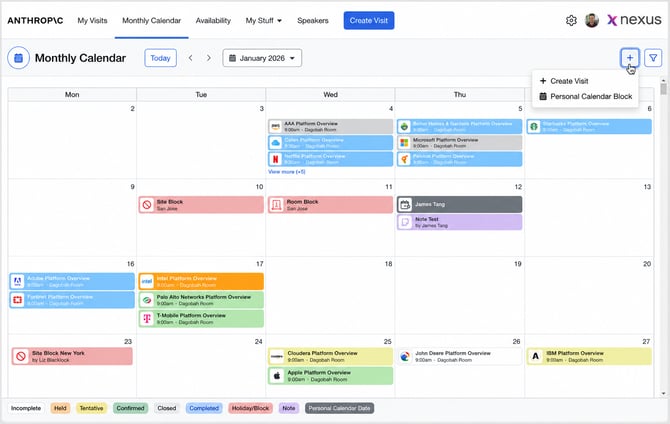
Admins can now give Account Managers / Requesters and Speakers access to the Monthly Calendar, with separate settings for each role.
- Choose which sites each role can see.
- Control whether each role sees Visit Summary, Site/Room Blocks, and Notes.
- Allow Account Managers to create Personal Calendar Blocks for selected people or everyone.
- Shared Monthly Calendar links take users to the right page after login or SSO.
Action required: Monthly Calendar access is off by default. An Admin turns it on in Settings > Global Settings > Account Manager and Speaker.
Learn more about Monthly Calendar access -->
AI Executive Brief
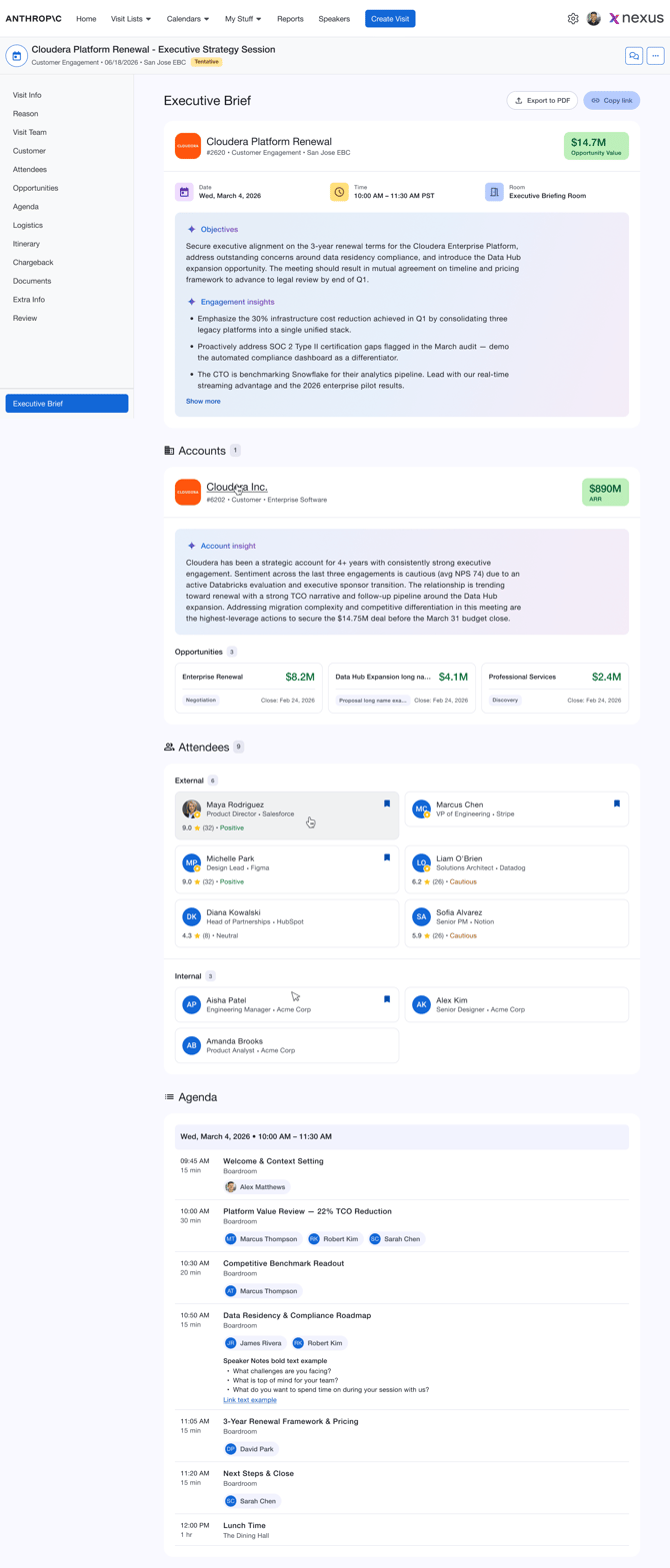
The AI Executive Brief brings a visit's key information, AI-generated objectives and insights, accounts, opportunities, attendees, and agenda together in one place.
- AI-generated Objectives & Insights, based mainly on the visit's Reason for Visit answers.
- Account cards with AI Account Insights and opportunities, plus attendee cards with ratings and sentiment.
- Open it from Visit Details, the Visit List, calendar views, and the Room Schedule.
- Share it with a link, add it to emails with the new Executive Brief Link template parameter, or export it as a PDF.
- Available automatically once a visit reaches Tentative.
Action required: None. Note that anyone with a shared AI Executive Brief link can open it without signing in.
Learn more about the AI Executive Brief -->
Enhanced Nexus-to-Salesforce Engagement Synchronization
Admins have more control over which Salesforce organizations receive Nexus Engagements.
- Sync eligible Engagements even without a valid Salesforce Account or Opportunity.
- Choose the Salesforce destination for Engagements created in Nexus.
- Use Sync all engagements to Salesforce to send every eligible Engagement to one or more Salesforce organizations.
- Existing Salesforce links and sync timing rules don't change.
Action required: Upgrade the Nexus Salesforce managed package to version 7.0 first, then turn on the settings in Settings > Global Settings > Miscellaneous. Both settings are off by default.
Learn more about Salesforce Engagement sync -->
Report Builder – Unified Attendees
Report Builder now combines Internal and Customer attendees into one Attendee Fields category, with one report row per attendee.
- Use the same columns for both attendee types.
- Use the new Attendee Type field and filter to show or limit attendee types.
- New fields and filters: Visit Confidentiality, Room (By Visit), and Speaker Status.
- The new fields work in exports, shared and scheduled reports, summaries, and charts.
Action required: Review saved and scheduled reports that include both Internal and Customer attendee fields. They now return one row per attendee, so their row counts and totals may change.
Learn more about unified attendee reporting -->
External Request Form – Additional Attendees
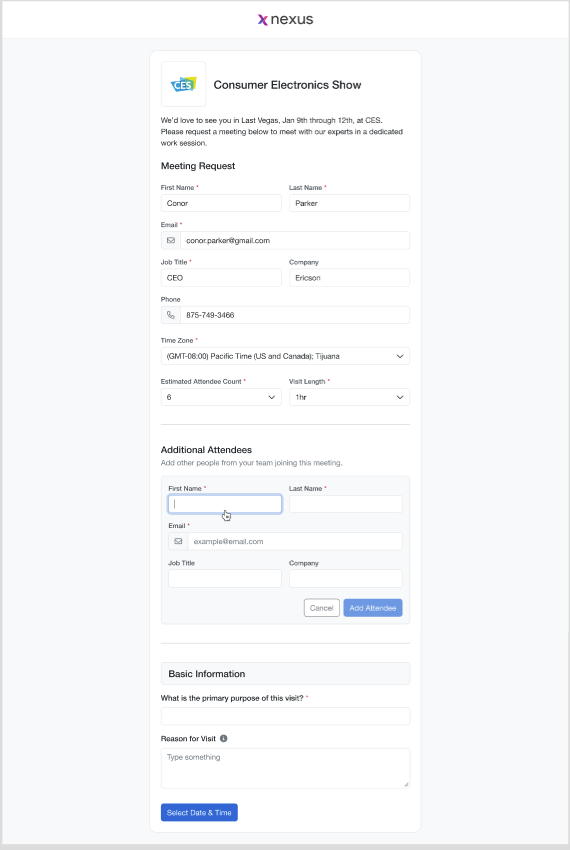
External requesters can now add one or more additional attendees on the External Request Form, and those attendees are added to the resulting visit automatically.
- Admins can rename or hide the Additional Attendees section for each External Visit Type.
- First Name, Last Name, and Email are required. Job Title and Company can be configured.
- Existing Customer/External people are matched by email, to avoid duplicates.
- The public form never shows existing Nexus person information.
Action required: Review the Additional Attendees settings in Request Form Setup > [External Visit Type] > External.
Learn more about Additional Attendees -->
Additional enhancements
Salesforce Custom Account and Opportunity IDs: Nexus now supports your organization's custom Salesforce Account and Opportunity IDs when creating visits from your CRM, including in Add from CRM search, filtering, and results where configured. Standard Salesforce IDs are still used behind the scenes for matching and sync. Requires the Nexus Salesforce managed package version 7.0. Learn More about Salesforce Custom Account and Opportunity IDs
Speaker Search Filter for Linked Topics: When you choose a speaker for an agenda topic, a new Linked to Topic filter shows speakers linked to that topic. It's turned on automatically when the Linked Topics speaker field is active and set as filterable. Search and filters now work together, and Clear All returns you to Suggested Speakers.
Calendar and Participant Schedule display updates: The Select Visit Date window shows the month on each date card. Weekly Calendar rows use lighter status colors so visits, blocks, notes, and personal calendar dates are easier to tell apart. Participant Schedule slots have better contrast and show their text on one line. Learn More about UI Updates
Conversion: Admins can now create an internal user, speaker, or person profile for someone who already exists as an external attendee, using the same email address. Nexus reuses the existing person record instead of creating a duplicate. Domain whitelist rules still apply. Learn More About converting external to internal users
Bug fixes
System Maintenance Data Cleanup: Automation cleanup preview and execution now complete successfully.
Report Schedule Updates: The Save button no longer becomes disabled after you change schedule days in the Report Schedule window.
Restricted Screen Access: Restricted admin screens can no longer be opened from a copied URL by users without the right permissions.
Availability Calendar Access: The Availability option no longer appears for Account Managers when Availability Calendar access is turned off in Global Settings.
Visit List Filter Performance: Visit List filters load faster when many people are using them at once.
Room Assignment Visit Length Display: Duplicate Visit Length values no longer appear in the Edit Assignment window.
Visit List Loading: The Visit List no longer shows a server error when there are no visits to display.
Visit Journey Navigation: Sections within the Visit Journey open correctly again.
SSO Login Reliability: Fixed an issue where some users saw an SSO error when logging in.
Visit Status Change from Actions Menu: Changing a visit's status to Declined from the actions menu now works.
Salesforce and Off-Site Location Display: Salesforce Account details and Off-Site Location content now display correctly.
Existing Attendee Data Population: Adding an existing Customer or Internal attendee now fills in their details correctly.
Estimated Attendee Count Dropdown Display: The Estimated Attendee Count dropdown now displays correctly in the multi-day date and time window.
Visit List Status Filter: The Visit List Status filter now returns the expected results.
Visit API Response Reliability: Visit API requests with certain parameter combinations no longer return an internal server error.
Itinerary Data Synchronization: Air Arrival and Air Departure details now fill in correctly in Nexus itineraries.
Itinerary Section Reliability: The Itinerary section now loads and works as expected.
Visit Creation Flow: Visits now save correctly, and you can move to the next section during visit cr