
The AI Executive Brief helps internal teams prepare for an engagement without checking several areas of Nexus separately.
Before you start
- Who can use it: Admins, Briefing Managers, and Engagement Managers who can access the visit. Account Managers / Requesters when it's enabled for them in the request form.
- Action required: None. The AI Executive Brief is on by default and becomes available automatically once a visit reaches Tentative.
- Where to find it: Visit Details, or Executive Brief in the Open/Quick Actions menu on visit cards, the Visit List, the Weekly and Monthly Calendars, and the Room Schedule.
Heads up: Anyone with an AI Executive Brief shared link can open it without signing in to Nexus, and the link doesn't expire. Share the link only with the people who should see the visit's information.
How do I open the AI Executive Brief for a visit?
Open the visit and select Executive Brief from Visit Details, or select Executive Brief from the visit's Open/Quick Actions menu in the Visit List, a calendar view, or the Room Schedule.
There's no button to create an AI Executive Brief. Nexus creates it automatically when the visit reaches Tentative.
What's in the AI Executive Brief?
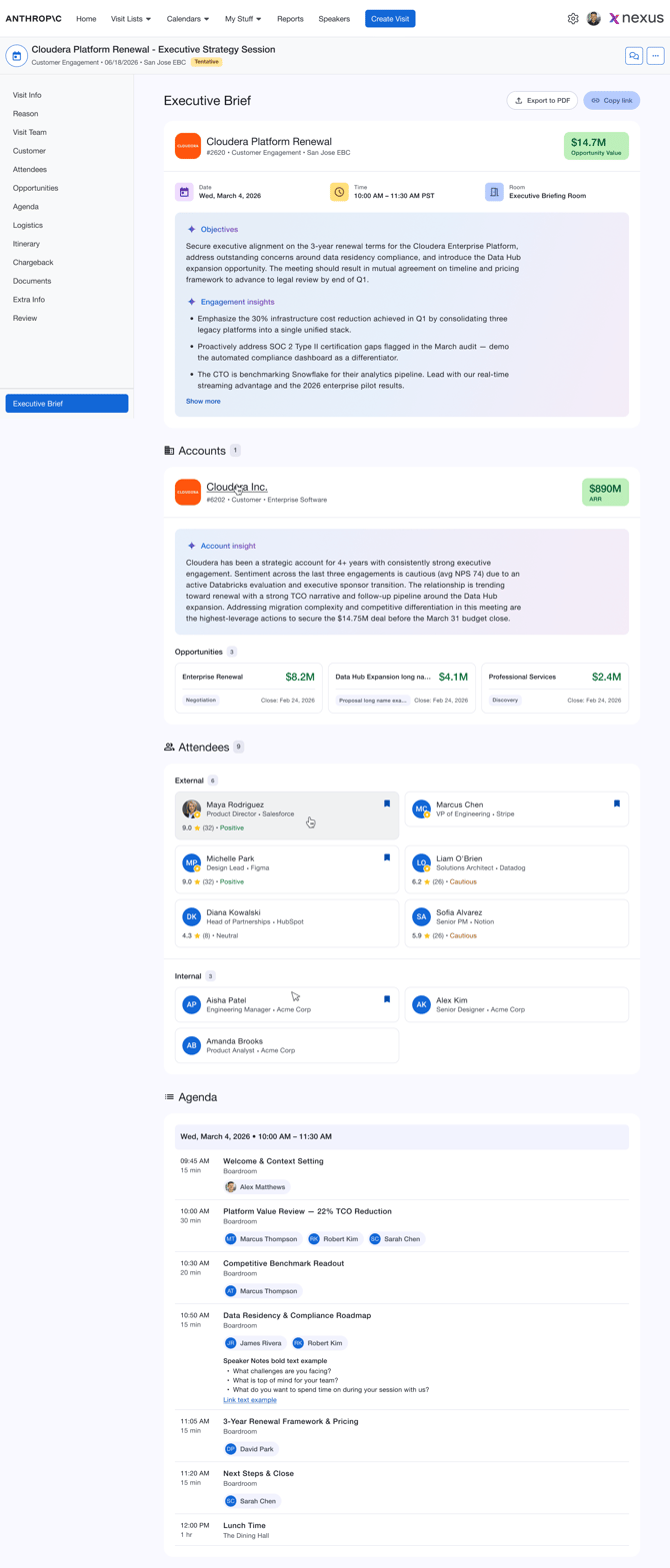
The AI Executive Brief has five sections, in this order:
- Visit Information: visit name, site, dates, times, time zone, Visit ID, room, and the total value of associated opportunities.
- Objectives & Insights: an AI-generated summary of the visit's purpose and the context that matters most. The visit's Reason for Visit / Objectives answers are the main source.
- Accounts: each associated account with its industry, ARR, AI Account Insight, and visit opportunities (name, value, close date, stage). Select an account for more detail.
- Attendees: attendee cards grouped using your organization's attendee labels, with Key Attendee and Attending Virtually indicators, a historical rating, and sentiment where available. Select an attendee for their engagement history.
- Agenda: the full agenda in time order, including presenters and speaker notes. Multi-day visits show each day one after another.
Sections with no data are hidden. If one section is still loading or missing information, the other sections still display.
How do I share the AI Executive Brief?
Click Copy Link in the top-right corner of the AI Executive Brief, then send the link to the people who need it.
- Each visit has one AI Executive Brief link, and copying it again gives the same link.
- The link always shows the latest AI Executive Brief information when opened.
- The shared link and PDF show your organization's branding. The AI Executive Brief inside Nexus doesn't.
- Speakers don't get the AI Executive Brief inside Nexus, but they can open a shared link or PDF.
How do I add the AI Executive Brief link to an email template?
Insert the Executive Brief Link parameter, 0, into the email template. When the email is sent, the parameter becomes that visit's AI Executive Brief shared link.
Exception: The Executive Brief Link parameter isn't available in Held Date email templates.
How do I export the AI Executive Brief as a PDF?
Click Export to PDF in the AI Executive Brief, or choose it from the Export/Quick Actions menu in Visit Details, the Dashboard, the Visit List, the Weekly and Monthly Calendars, or the Room Schedule.
The PDF contains the complete AI Executive Brief, including every account, opportunity, attendee, and agenda day, and the full AI Account Insight text. The file is named Executive Brief_[Visit ID]. Each export uses the latest information, so export a new PDF when you need an up-to-date copy.
When does AI Objectives & Insights update?
For Tentative and Confirmed visits, Nexus checks for relevant changes each time someone opens the AI Executive Brief, and regenerates Objectives & Insights only if something relevant changed.
Relevant changes include the Reason for Visit, accounts, opportunity value or stage, attendees or their roles, agenda topics or presenters, and updated AI Account Insights. Room or time changes don't necessarily cause regeneration.
Exception: For Completed, Closed, Cancelled, and Declined visits, AI Objectives & Insights are frozen and don't update. Non-AI information, such as visit details, attendees, and the agenda, still shows current data. If the visit moves back to Tentative or Confirmed, AI content can update again.
What happens if AI is turned off or AI credits run out?
The rest of the AI Executive Brief keeps working. Only the AI-generated content is affected.
- AI turned off: Objectives & Insights shows the visit's answered Reason for Visit questions and answers instead, or "Insights not available" if there are none. A message explains that AI must be enabled.
- AI credits used up: the last AI-generated Objectives & Insights and Account Insights stay visible with their generation date, and a message explains that they can't be refreshed right now. Updates resume once credits are available.
What should I know about the AI Executive Brief?
- The AI Executive Brief isn't available for Held or Incomplete visits, or for Erased visits.
- Completed, Closed, Cancelled, and Declined visits keep an AI Executive Brief only if one was already created. A new AI Executive Brief isn't created for those statuses.
- Everyone who can see the AI Executive Brief sees the same content. Sections aren't hidden by role.
- Attendee ratings use survey feedback from the past 12 months, on a 1–10 scale, with the number of visits shown, for example 8.7 ★ (5). Sentiment shows as Positive, Neutral, or Cautious. Neither appears without enough feedback.
- The AI is instructed to use only information in Nexus and not to invent facts, metrics, dates, commitments, attendees, opportunities, or account details.
Frequently asked questions
Why don't I see the Executive Brief option for a visit?
The visit must be Tentative or Confirmed, or already have an AI Executive Brief from before it was completed or closed. You also need access to the visit. For Account Managers / Requesters, the AI Executive Brief must be enabled in the request form.
Does the AI regenerate every time I open the AI Executive Brief?
No. Nexus reuses the existing AI content unless relevant visit information has changed.
Can someone without a Nexus account open a shared AI Executive Brief?
Yes. The shared link doesn't require signing in.
Does the AI Executive Brief shared link expire?
No. The shared link keeps working as long as the visit exists and has an AI Executive Brief. If the visit is deleted, the link shows that the content is no longer available.
Why doesn't an account have an AI Account Insight?
The AI Account Insight may still be generating, there may not be enough account information, or AI may be turned off or out of credits. The rest of the account card still displays.
Why doesn't an attendee have a rating or sentiment?
Ratings and sentiment only appear when the attendee has enough survey feedback from the past 12 months.
Why do Objectives & Insights look out of date?
For an active visit, reopen the AI Executive Brief so Nexus can check for changes. For Completed, Closed, Cancelled, or Declined visits, AI content is frozen on purpose. Also check that your organization has AI credits available.
Need help? See How do I contact Nexus Support?.