
-
- AI Account Insights
- Speaker Availability with O365 and GCal Integration
- Visit Limit Override
- Allow Requesters to Select Unavailable Dates and Times
- Bulk Room Assignments
- Briefing Doc Export Enhancements
- Backward Visit Status Transitions
- API Enhancements - Speaker Management
- Itinerary > Attendee Flight Confirmation #'s
- Itinerary > Add Service Providers on the fly
- Multi-Day Visit Date & Time Email Template Parameters
- 15 Min Room/Site Blocks
- Bug Fixes
Featured Enhancements
1. AI Account Insights
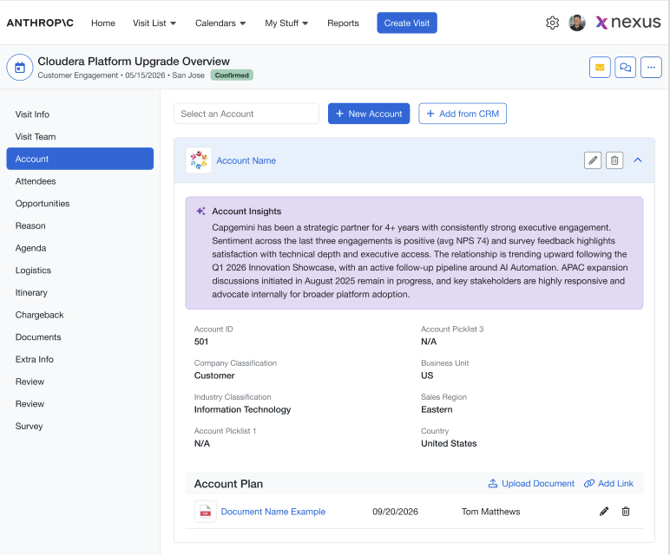
AI Account Insights provides a concise account overview within the visit so teams can prepare faster using supported account, opportunity, stakeholder, relationship, and account-plan context.
Learn More -->
- A new AI Account Insights panel is available in the Account section of a visit.
- The insight can summarize meeting context, opportunity context, stakeholder context, and relationship context.
- Account Plan documents can be uploaded against an account and used as supporting context.
- Extracted Account Plan context focuses on strategic priorities, known challenges, and relationship map details.
- Missing or unsupported data is omitted rather than inferred.
Where to Configure:
- Administration / Admin Settings > Request Form Customization > Customer / Account section
2. Speaker Availability with O365 and GCal Integration
Engagement Managers can now see speakers' real calendar availability during agenda planning, helping teams identify conflicts before assigning speakers to a topic.
Learn More -->
Highlights:
- Integrations with O365 and Google Calendar are supported.
- Availability indicators are shown in Suggested Speakers and Search Speakers.
- Availability is evaluated using internal (Nexus) commitments + External Calendar Events
- Hover popovers provide availability details without opening speaker records.
- Availability recalculates automatically when agenda timing or speaker assignments change.
Where to Configure:
- Admin > Integrations > O365/GCal
3. Visit Limit Override
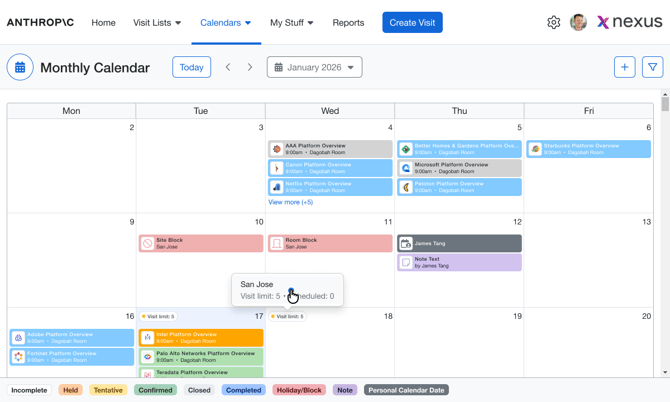
Administrators and Briefing Managers can now temporarily override the Maximum Visits Per Day setting for specific dates without changing the default site configuration - allowing more control over request capacity when resources are limited.
Learn More -->
Highlights:
- Overrides can be created for a single day or a date range.
- Overrides can be managed directly from Monthly and Weekly Calendar views.
- Override values are enforced automatically during availability checks and booking.
- Default site capacity remains unchanged.
- Capacity can be increased or decreased for specific dates as needed.
Where to Configure:
- Monthly Calendar
- Weekly Calendar
4. Allow Requesters to Select Unavailable Dates and Times
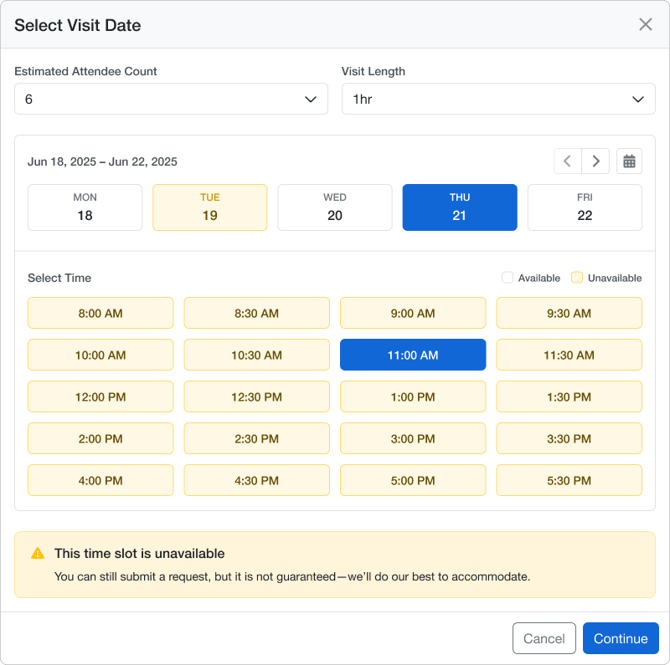
A new setting can give requesters the ability to select dates & times that are marked as unavailable. This is intended to give more flexibility to accept high-value engagements, while warning the requester that their selection is not guaranteed.
Learn More -->
Highlights:
- New Site/Visit Type setting controls whether unavailable dates can be selected by requester.
- Unavailable dates remain visible in the date picker.
- Unavailable dates and time slots can now be selected during request creation or updates.
- Requests can be submitted even when the selected date is unavailable.
- Existing availability calculations and scheduling rules remain unchanged.
- Customizable message appears when an unavailable date/time is selected
Where to Configure:
- Admin > Visit Type > Unavailable Date Selection
5. Bulk Room Assignments
Users can now assign multiple rooms in one workflow, making it easier to schedule rooms for single and multi-day visits and manage multi-room assignments more efficiently.
Learn More -->
Highlights:
- Multiple rooms can be assigned in a single workflow.
- Room assignments can be copied across all visit days.
- User is alerted of room conflicts prior to saving.
- Existing room scheduling and availability rules remain unchanged.
6. Briefing Document Export Feature
The Nexus export capabilities have been dramatically improved to enable more visit data to be rendered within the document, and new layout formats for better a better design experience.
Learn More -->
- Document content is organized in a more structured format in exported briefing documents.
- Session ordering is preserved in the exported document.
- Only accepted presenters are rendered in supported sections.
- Rich text formatting and conditional content rendering are supported.
- Existing export permissions and workflows remain unchanged.
New Briefing Doc export parameters available:
- Visit details:
visit_time_zone,visit_time_zone_display,visit_id - Agenda session details:
topic_abstract,speaker_notes,presenter_accepted - Opportunity information:
opp_name,opp_amount,opp_stage - Account information:
account_industry - Reason for Briefing: dynamic configured Reason-for-Briefing fields are supported and rendered only when populated.
- Existing template mappings verified:
visit_name,visit_start_MMDDYY,Day1FIELDMONddyy,time1FIELD,subjectFIELD,spkrFIELD,spkrTITLE,time2FIELD,QuestionID1,ResponseID1,CUSTattendeeFIELD,CUSTtitleFIELD,CUSTcompanyFIELD,INTattendeeFIELD,INTtitleFIELD,INTcompanyFIELD,customer_name,AcctMgrName,customer_company,customer_city,customer_state,customer_segment,customer_region,spkrPrefixFIELD,spkrtitleFIELD, andBIO.
7. Backward Visit Status Transitions
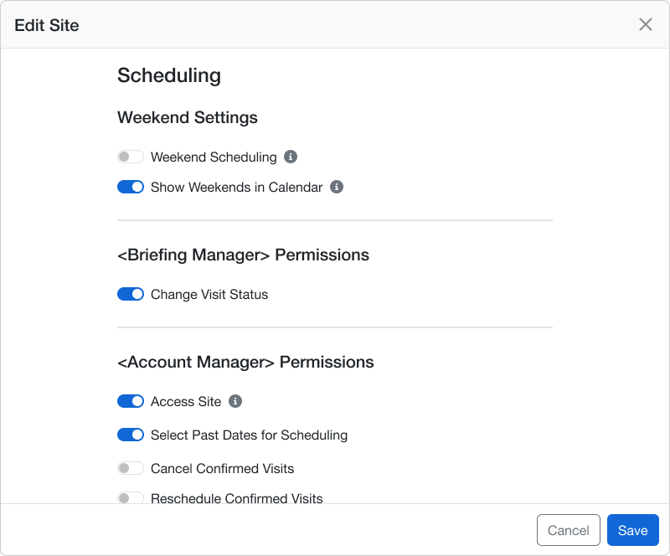
Authorized users can now move visits backward through supported status transitions when operational corrections are needed.
Learn More -->
Highlights:
- Supported backward transitions include Completed to Confirmed, Tentative, or Cancelled, and Confirmed to Tentative.
- Site-level configuration controls whether Briefing Managers can perform backward transitions.
- Invitation handling updates automatically based on the destination status.
- Surveys, notes, and historical visit information are preserved.
- Backward transitions are recorded in the visit change history.
Where to Configure:
- Administration > Site Settings
- Backward Visit Status Transition Configuration
8. API Enhancements - Speaker Management
The V3 API now supports new endpoints to retrieve and update Speaker Profile information, including custom speaker fields configured by your program.
Learn More -->
Highlights:
- A new first-class Speaker API resource is available.
- Dedicated endpoints support speaker creation, retrieval, updates, and search.
- Dynamic speaker field definitions and configurable option sets are exposed through the API.
- Server-side validation and role-based field visibility are supported.
- Existing visit and agenda APIs remain supported for backward compatibility.
9. Itinerary > Attendee Flight Confirmation #'s
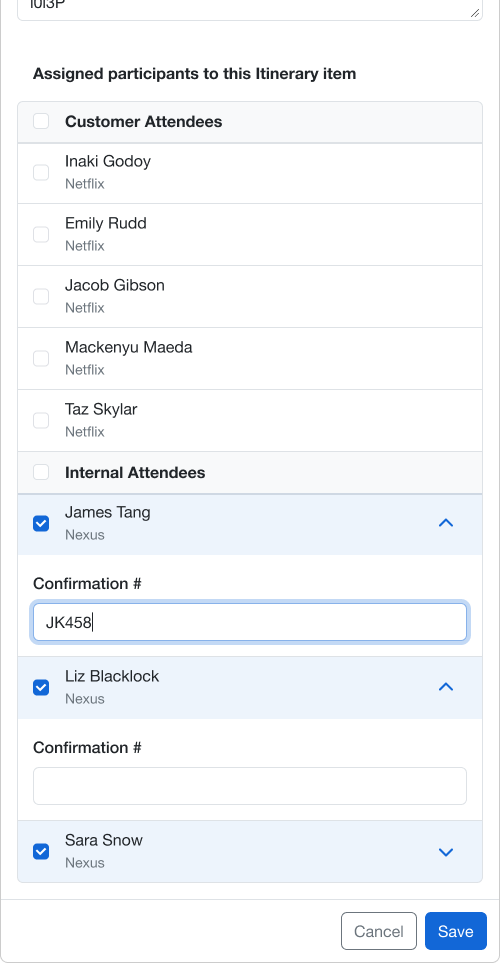
Flight confirmation # can now be managed for each attendee individually, making it possible to create a single flight Itinerary item, and each attendee have a unique confirmation #.
Learn More -->
Highlights:
- Each attendee now has an individual confirmation number field.
- Flight confirmation can be updated for one attendee without affecting others.
- Group confirmation #'s have been migrated to the new Attendee confirmation # field as part of this update.
10. Itinerary > Add Service Providers on the fly
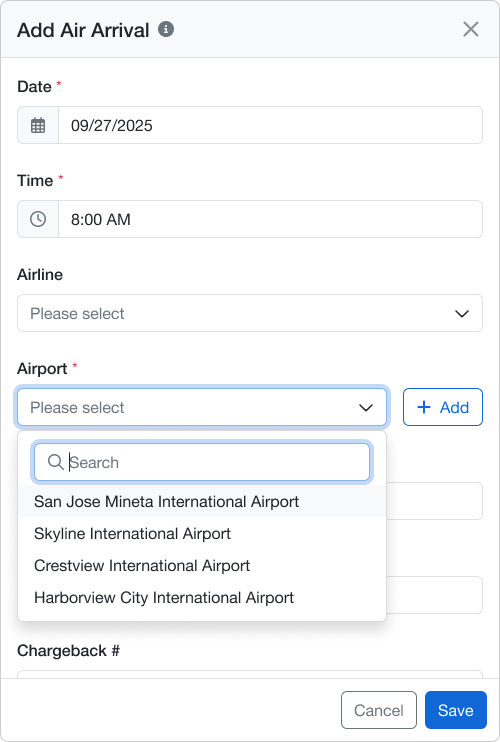
Users can now add missing itinerary providers (Airports, Hotels, Restaurants, etc) directly from the itinerary form, reducing dependency on separate master data updates.
Learn More -->
Highlights:
- A new +Add action is available on supported itinerary provider fields.
- The new provider is selected automatically for the current itinerary item.
- Newly created providers become immediately available for future use.
- A search function has been added to improve efficiency in finding providers when list is long.
11. Multi-Day Visit Date & Time Email Template Parameters
Admins can now use two new template parameters that automatically format visit dates and date/time ranges for single-day and multi-day visits to more clearly communicate visit details with attendees.
Learn More -->
Highlights:
- New date range parameter supports single-day and multi-day visit rendering.
- New date-time range parameter supports date and time rendering in one token.
- Existing site date format and time zone logic continue to apply.
- The new parameters are available in supported email templates and invitation templates.
- Existing templates remain unchanged unless the new parameters are added.
Where to Configure:
- Administration > Global Settings > Email Invitation Template
12. 15 Min Room/Site Blocks
Room and Site Blocks now support a minimum duration of 15 minutes, giving teams more flexibility when reserving short windows of time.
Learn More -->
Highlights:
- Room Blocks can now be created with a 15-minute duration.
- Site Blocks can now be created with a 15-minute duration.
- Existing blocks can be edited down to 15 minutes.
- 15-minute blocks are displayed across Room Schedule and supported views.
Bug Fixes
Site Block Deletion
Deleting a Site Block no longer leaves the calendar stuck on a loading overlay.
Visit Request Date Validation
Fixed an issue where some users saw an invalid date error while requesting a visit.
Visit List Export
The exported Visit List now matches the Visit List view more consistently.
Review Tab Opportunity Field Label
An Opportunity field label now displays correctly on the Review tab, matching the opportunity card and edit view.
Coordinator Workload and Assignment Counts
Coordinator workload and assignment counts now include only active future visits, so availability and workload views are more accurate.
Dropdown Menu Display
Dropdown menus no longer open upward and get cut off.
Email Template Text Wrapping and Alignment
Longer text in Email Templates now wraps and aligns correctly.
Remove Presenter Action Visibility
The Remove Presenter action in Topic Administration is now easier to see.