
AI Account Insights uses available visit, account, opportunity, attendee, engagement history, and relationship data to generate a concise account overview. The insight is designed to help users prepare faster, focus on the right commercial and relationship context, and avoid reviewing multiple sections manually before a visit.
This release also introduces account-wise Account Plan Upload from the Account section of a visit. When enabled by configuration, users can upload Account Plan documents against a specific account. Supported uploaded Account Plan documents can be processed in the background and used as supporting context for AI Account Insights.
Account Plan document extraction focuses on identifying key structured insights such as strategic priorities, known challenges, and relationship map details, which are then used to enrich the AI-generated account overview.
Note: AI Account Insights are intended to support meeting preparation. They do not replace user review of the visit, account, attendee, opportunity, or CRM details.
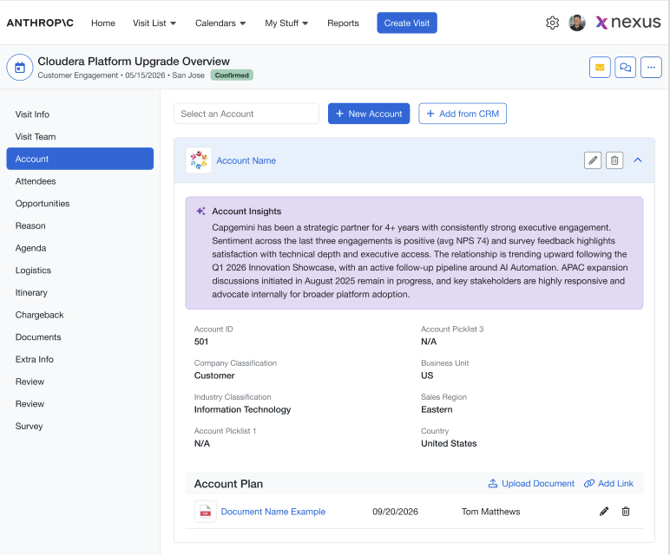
Table of Contents
- Overview
- What’s New
- Functional Summary
- Key Capabilities
- AI Account Insights – Overview
- Configuration & Administration
- Account Plan Upload Configuration
- Configuration Options
- How It Works / User Flow – Step-by-Step
- 1. Open a Visit
- 2. Navigate to the Account Section
- 3. Review AI Account Insights
- 4. Upload an Account Plan Document
- 5. Understand Account Plan Processing
- New AI Account Insights panel available from the Account section of a visit.
- AI-generated account overview using supported visit, account, opportunity, stakeholder, relationship, and account-plan context.
- Account-wise Account Plan Upload area under the expanded account panel.
- Ability to upload supported Account Plan documents against an account.
- Admins can configure Account Plan Upload as Optional, Required, Not Used, or Hidden from Account Manager.
- Account Plan extraction specifically identifies strategic priorities, known challenges, and relationship map insights.
- Missing, incomplete, failed, or unsupported data is handled gracefully. AI Account Insights continue without unsupported context.
Functional Summary
AI Account Insights generates a short, business-readable summary for an account in the context of a visit. The system uses supported signals and supporting context rather than exposing raw system data or internal diagnostics.
The insight may include:
- Meeting intent or reason for the engagement.
- Key topics or business themes.
- Relevant opportunity or deal context.
- Deal significance where supported opportunity amount data exists.
- Deal lifecycle or stage context where supported opportunity data exists.
- Stakeholder or executive presence where supported attendee/contact data exists.
- Relationship or engagement recency context where supported data exists.
- Account Plan context derived from extracted strategic priorities, known challenges, and relationship map insights.
Key Capabilities
- Concise AI-generated Account Insights directly in the visit Account section.
- Meeting context interpretation from visit request information.
- Opportunity and deal context where supported opportunity data is available.
- Stakeholder and executive context where supported contact or attendee data is available.
- Relationship and recency context where supported data is available.
- Extraction of strategic priorities, known challenges, and relationship map from Account Plan documents.
- Controlled AI output that avoids unsupported claims.
AI Account Insights – Overview
|
Area |
What this means for users |
|---|---|
|
Account preparation |
Users can quickly understand the most relevant account context before the engagement |
|
Meeting context |
The system can identify the likely meeting intent and key topics |
|
Opportunity context |
Relevant opportunity or deal information may appear |
|
Deal significance |
Deal importance may be included when supported |
|
Stakeholder context |
Senior stakeholder or executive presence may be included |
|
Relationship context |
Relationship strength, risk, or recency may be included |
|
Account Plan context |
Extracted strategic priorities, known challenges, and relationship map enrich insights |
|
Missing data handling |
Unsupported or missing information is omitted |
|
Final output |
Users see a concise business summary |
Configuration & Administration
Account Plan Upload Configuration
Admins can configure Account Plan Upload by Visit Type from Request Form Customization.
Recommended navigation:
Administration / Admin Settings > Request Form Customization > Customer / Account section
A configurable row named Account Plan Upload is added under the existing Customer / Account section.
Configuration Options
|
Config Value |
What It Means |
Expected Behavior |
|---|---|---|
|
Optional |
Account Plan Upload is enabled but not mandatory |
Users can upload documents but are not required |
|
Required |
Account Plan Upload is mandatory |
At least one Account Plan document required per account |
|
Not Used |
Account Plan Upload is turned off |
Account Plan section hidden |
|
Hidden from Account Manager |
Hide from Account Manager users |
Section hidden for Account Manager users |
1. Open a Visit
- Open Nexus.
- Open or create a visit.
- Navigate to the Account section.
2. Navigate to the Account Section
- Add or select an account.
- Expand the account panel.
- Review Account Details and AI Account Insights.
3. Review AI Account Insights
The AI Account Insights panel displays a concise summary including:
- Meeting context
- Opportunity context
- Stakeholder context
- Relationship context
- Account Plan insights (strategic priorities, known challenges, relationship map)
4. Upload an Account Plan Document
- Expand account panel.
- Click Upload Document.
- Enter title and select file.
- Click Add.
5. Understand Account Plan Processing
After upload, processing runs in the background.
The system extracts:
- Strategic priorities – customer goals and initiatives
- Known challenges – risks, blockers, constraints
- Relationship map – stakeholders, influencers, decision-makers
These extracted insights are used to enhance AI Account Insights.
Important Considerations & Limitations
- Extraction focuses only on strategic priorities, known challenges, and relationship map.
- Only machine-readable text is processed.
- Images and scanned content are ignored.
- AI Insights continue even if extraction fails.
- Missing data is not inferred.
FAQs
What are AI Account Insights?
AI Account Insights are concise AI-generated summaries that help users understand relevant account context before a customer engagement.
Where do I find AI Account Insights?
Open a visit, go to the Account section, and expand the account panel. The AI Account Insights panel appears near the account details.
Why can’t I see the Account Plan area?
The Account Plan area may be hidden because Account Plan Upload is configured as Not Used, hidden for Account Manager users, or the account panel is not expanded.
Why is Account Plan required for my visit?
The Visit Type may have Account Plan Upload configured as Required. In that case, each account on the visit must have at least one Account Plan document before save/submit.
Can I upload multiple Account Plans?
Yes. Multiple Account Plan documents can be added to the same account, one at a time.
What file types are supported?
Supported upload types are controlled by validation and may include document types such as PDF, Word, and text files. If a file type isn’t accepted, contact support@nexuscenter.io and we can confirm what’s enabled for your organization
Why did my uploaded Account Plan not change the insight immediately?
Processing runs in the background. AI Account Insights do not require a live refresh immediately after upload.
Why are images or scanned pages ignored?
This release processes supported machine-readable text only. OCR and image analysis are not included.
What happens if Account Plan extraction fails?
The Account Plan item remains saved, but AI Account Insights continue without that failed Account Plan context.
Is AI Account Insights customer-facing?
AI Account Insights are intended for internal preparation. Users should review and adapt any information before using it externally.